Chapter 9: Packaging & Publishing Standalone Games
When your game is complete and ready for the world to play, RagNext Studio makes it easy to build standalone, branded game packages for your players.
In this chapter, you will learn how to back up and share project packages (.ragpkg), use the standalone Publish Engine (PublishEngine), and deploy your game to Windows, macOS, Linux, and WebGL (Web Browsers).
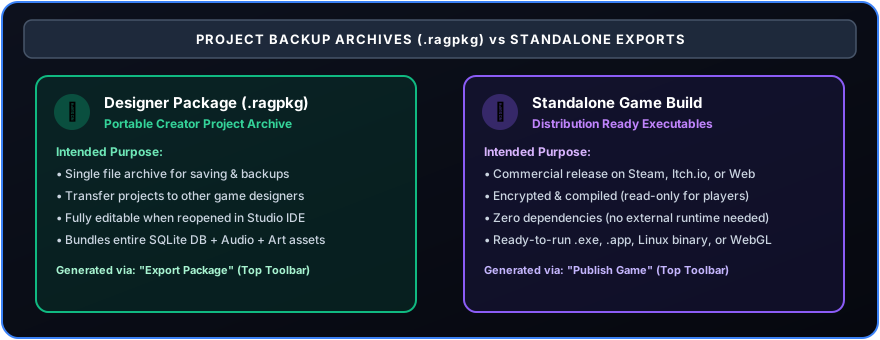
9.1 Project Packages (.ragpkg) vs. Published Standalone Games
Before publishing, it is important to understand the difference between a Designer Project Package and a Published Game:
9.2 Step-by-Step: Exporting & Backup Packages (.ragpkg)
To back up your project or send it to another creator:
- In the Top Toolbar of RagNext Studio, click 📦 Export Package.
- Select a save folder on your computer and name your file (e.g.
MyAdventure_v1.ragpkg). - Click Save. Studio packages all rooms, objects, action graphs, variables, and media assets into a single compressed
.ragpkgpackage file.
Importing Packages: If you receive a
.ragpkgfile from another creator, launch Studio and click 📥 Import Package. Select the file, and Studio will automatically extract the complete game workspace for you.
9.3 Step-by-Step: Publishing Standalone Games (PublishEngine)
When you are ready to release your game to the public on itch.io, Steam, or your website ragnext.com:
Step 1: Open the Publish Window
- In the Top Toolbar, click the 🚀 Publish button.
- The Standalone Publish Panel will open.
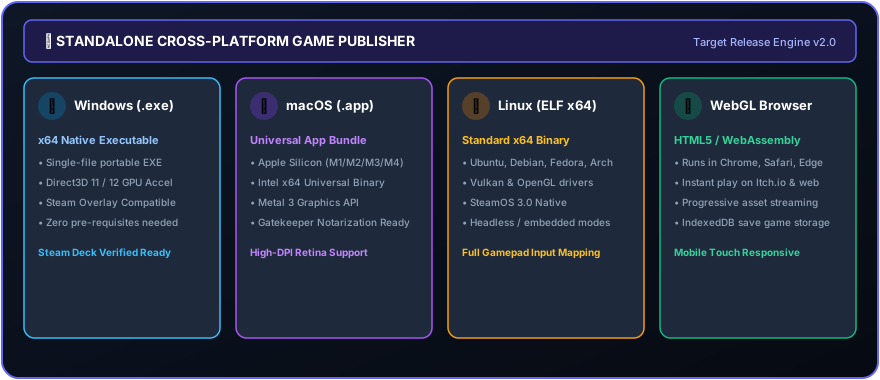
Step 2: Configure Publishing Settings
- Game Title: The official name displayed on your game executable window.
- Author Name: Your creator or studio name.
- Version: Version number (e.g.
1.0.0). - Target Platform:
- Windows: Produces a standalone Windows folder with executable (
.exe). - macOS: Produces a native Apple
.appbundle. - Linux: Produces an executable Linux binary.
- WebGL (Web Browser): Produces an HTML5 web package hostable on
ragnext.comor itch.io!
- Windows: Produces a standalone Windows folder with executable (
- Destination Folder: Select where on your computer the published game folder should be generated.
- Create Compressed .ZIP File: Check this to automatically generate a
.ziparchive ready for upload!
Step 3: Publish Game
Click 🚀 Publish Game Now. The Publish Engine takes the precompiled RagNext Player runtime, injects your game bundle and media assets, and generates your standalone game!